Running an Agent Network: What I Learned in Two Weeks
Two weeks ago, I set up an agent on a remote server. It could respond to Telegram messages, run shell commands, and search the web. Basic stuff.
Today, that single agent has become a network of three specialized agents that coordinate on projects, track their own work, maintain daily logs, monitor system health, index their own conversation history for future reference, and manage a knowledge base across two searchable vaults. The system runs 24/7, and most of its operational overhead is self-managed.
This post is about how that happened — the architecture decisions, the things that worked, and the things I’d do differently.
The Starting Point
The platform is OpenClaw — an open-source framework for running persistent agents. It handles the plumbing: connecting to messaging surfaces (Telegram, Discord, Signal), managing conversation sessions, tool access, scheduling, and sub-agent orchestration.
I’m running it on exe.dev, a managed VM hosting platform that made the infrastructure side easy. $20/month for a VM with enough resources to run the gateway, a few background services, and an embedding model for knowledge search. The selling point was simplicity — SSH in, install OpenClaw, and you’re running. No Docker orchestration, no Kubernetes, no infrastructure rabbit holes.
The first agent — Hal — started as a general-purpose assistant. It could answer questions, search the web, run commands, and read/write files. Useful, but not fundamentally different from a ChatGPT conversation with extra tools.
What changed things was giving it persistent state.
The Workspace as Memory
Agents wake up fresh every session. They don’t remember yesterday. This is the single biggest challenge in making them useful over time, and the solution is surprisingly low-tech: files.
OpenClaw gives each agent a workspace directory — a folder on disk that persists across sessions. What you put in it is up to you, but a few core files do the heavy lifting: SOUL.md (identity and principles), USER.md (who I am and what I care about), MEMORY.md (curated long-term memories with confidence scores), AGENTS.md (operating rules and workflows), and daily notes in memory/ that serve as raw operational logs.
Every session, the agent reads its core files before doing anything else. It sounds simple because it is. But it’s the single most impactful thing in the entire setup. An agent with well-maintained workspace files feels continuous — it picks up context, remembers decisions, and builds on prior work. Without it, every conversation starts from scratch.
The key insight is that the workspace files aren’t documentation — they’re the agent’s operating environment. You engineer them the same way you’d engineer any critical system component.
From One Agent to Three
For the first few days, Hal did everything — coding tasks, research, file management, monitoring. It worked, but I started noticing friction:
- Context windows filled up faster when the agent was juggling multiple concerns
- The operational overhead (system monitoring, cleanup, indexing) competed with the creative work (research, writing, project planning)
- Different tasks needed different approaches — ops work should be quiet and automated, while project work benefits from dialogue
So I split into three agents, each with a distinct role:
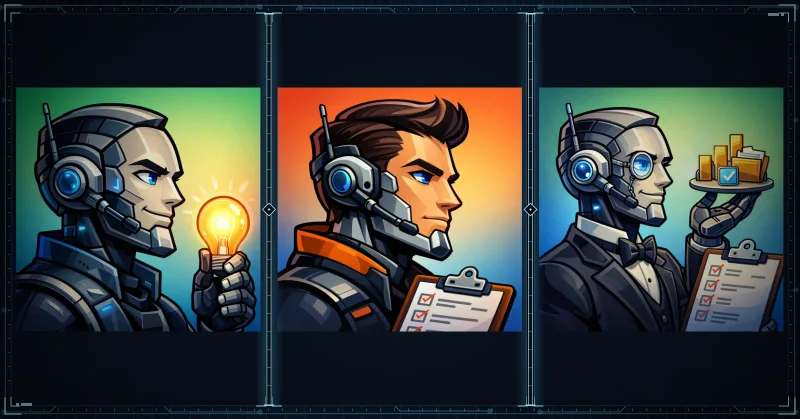
Hal — the coordinator. Handles content, communication, project management, and creative work. This is the agent I interact with directly most often. It manages the shared knowledge base, writes blog posts, coordinates with the other agents, and surfaces ideas proactively.
Marshall — the engineering manager. Owns technical implementation, code quality, architecture decisions. When there’s a coding task, Marshall gets dispatched. It claims work from the issue tracker, implements, commits with proper references, and reports back. It doesn’t chat — it ships.
Alfred — operations. Runs on automated schedules: system health monitoring, disk usage tracking, daily digest reports. Alfred’s job is to keep the house clean so the other agents can focus on their work. If something needs attention, Alfred escalates. Otherwise, it stays quiet.
Why Specialization Works
The split isn’t just organizational — it’s a context engineering decision. Each agent loads only the context relevant to its role. Marshall doesn’t need to know about my writing preferences. Alfred doesn’t need project history. By scoping what each agent cares about, you keep their context windows focused and their outputs sharper.
It also maps naturally to different interaction patterns:
- Hal: conversational, proactive, runs in my main chat
- Marshall: task-driven, spawned as sub-agents for specific work
- Alfred: automated, cron-scheduled, speaks only when something’s wrong
The three-agent setup has been stable for about a week now, and I haven’t felt the need to add more. Three feels like a natural team size — enough specialization to be useful, not so many that coordination becomes the bottleneck.
The Extended Brain: Searchable Knowledge
One of the most valuable things I set up was a knowledge search system using GNO — a tool that indexes markdown files and makes them searchable via keyword (BM25) and semantic (embedding) search.
I have two vaults indexed:
- My personal notes — an Obsidian vault with research, clippings, project documentation, and ideas. Years of accumulated context.
- The agent’s vault — Hal’s own knowledge base, plus automatically exported session transcripts from past conversations.
The session transcript indexing is the interesting part. Every hour, a cron job exports recent conversations to markdown files and indexes them. This means the agents can search their own past — “what did we discuss about X?” or “when did we set up Y?” — and find the actual conversation where it happened.
This is a concrete implementation of the context engineering principle: instead of trying to fit everything into the context window, you build retrieval systems that can surface relevant information on demand. The agent’s effective knowledge is much larger than what fits in a single conversation.
Automated Operations
Alfred runs on cron schedules, and a few other automated jobs run directly:
- Health monitoring — checks disk, memory, load, zombie processes. Escalates if thresholds are exceeded.
- Daily digests — summarizes system state, trends, and any findings that need attention.
- Vault syncing — pulls the latest version of my notes vault so agents always have current research.
- Session export — exports conversation transcripts to the knowledge search index.
- Heartbeats — periodic self-checks where agents review their own state, look for errors in logs, and evaluate whether anything needs attention.
The heartbeat system deserves a mention. It’s a checklist (HEARTBEAT.md) that the agent runs through periodically — am I still serving the right goals? Are there errors in recent logs? Anything I should proactively surface? It’s a lightweight self-monitoring pattern that catches issues before they compound.
Most of the time, these automated checks return “everything’s fine” and produce no output. That’s the point. The operational overhead is self-managed, and I only hear about it when something needs my attention.
Structured Work: Issue Tracking with Beads
For project work, we use Beads — an AI-native issue tracker that stores issues as JSONL in git. I wrote about Beads in my previous post, but the short version: each “bead” is a self-contained task with enough context for an agent to pick it up cold and complete it in a single session.
The workflow we’ve settled on:
bd ready— see what tasks have no blockers- Claim a task
- Do the work entirely within one session
- Commit with the bead ID in the message
- Close the bead with a summary of what was done
- Sync and push
This maps directly to the context engineering insight from the last post: size tasks so they fit in a fresh context window. Beads is the mechanism that makes that practical.
The discipline aspect has been the hardest part. Getting agents to consistently track their work through beads — creating tasks before starting, claiming before working, closing when done — requires reinforcement. We built a workflow skill that documents the rules, and the agents reference it at the start of relevant sessions. It’s not perfect, but it’s getting more reliable.
What’s Been Hard
I don’t want to paint an unrealistically smooth picture. Some things have been genuinely challenging.
Context window management is constant work. Agents degrade around 60% context usage. Long conversations produce worse outputs, and you can feel it happening — responses get less precise, instructions get forgotten, the agent starts repeating itself. You have to actively manage this: flush important context to files before the window fills up, keep sessions focused, and design workflows that don’t require carrying too much state.
Workflow enforcement is fragile. I’ve mentioned this before, but it bears repeating: agents don’t follow rules reliably. Even with documented skills, explicit instructions, and reinforcement at session start, agents will skip steps, forget to close issues, or ignore conventions. One agent not following the process can cascade — corrupting task state, confusing the next agent about what’s been done. The more complex the workflow, the harder enforcement becomes.
Coordination has overhead. Three agents is better than one for focus, but coordination between them isn’t free. Messages between agents sometimes time out. Sub-agent sessions have resource limits. Getting Marshall to report results back to Hal in the right format took iteration. The system works, but there’s real plumbing involved.
Stale context is a sneaky problem. Workspace files that don’t get updated become a source of confusion. An outdated TOOLS.md entry or stale memory can send an agent down the wrong path. The daily notes help, but maintaining the accuracy of long-lived files requires discipline — from me, not just the agents.
What I’d Do Differently
Start with specialization sooner. I ran a single agent for days before splitting into three. The improvement in focus and output quality was immediate. If I were starting over, I’d define roles from day one, even if the initial scope is small.
Invest in workspace files early. The quality of AGENTS.md, SOUL.md, and the daily notes directly determines how effective the agents are. Spend time engineering these files — they’re the most important code in the system.
Automate operational tasks from the start. Every manual check I was doing (disk space, system health, vault syncing) eventually got automated. I should have set up cron jobs in the first few days instead of doing it ad hoc over two weeks.
Be deliberate about what each agent loads. Context window management is everything. The more precisely you scope what an agent needs to know for its role, the better its outputs. Don’t give every agent access to everything — give each agent access to what it needs.
Where It’s Going
This system is still evolving. We’re actively working on the website you’re reading this on — Hal handles the content, Marshall handles the technical implementation, and they coordinate through beads and direct messaging. It’s the first real collaborative project across the agent network.
I’m also thinking about how to make the operational patterns more portable. The workspace file structure, the heartbeat system, the three-agent specialization — these patterns aren’t OpenClaw-specific. They’d work with any persistent agent framework that gives you file access and scheduling.
But that’s a topic for a future post. For now, the system runs, the agents collaborate, and I’m spending less time on infrastructure and more time on work that matters.